Duplicate Reservations Report
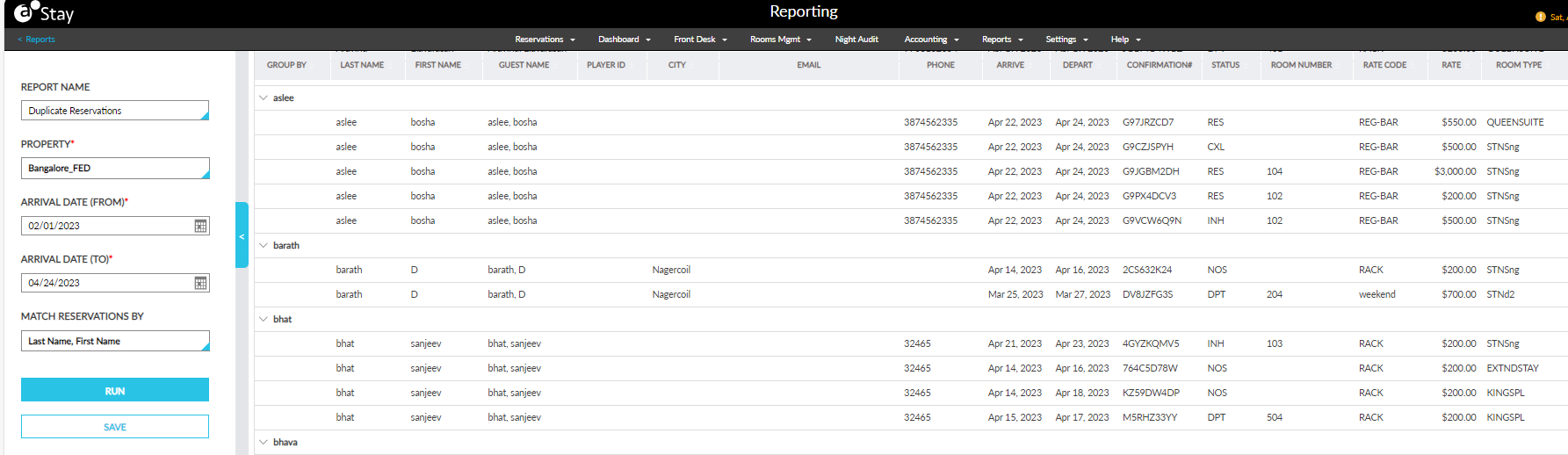
The Duplicate Reservations Report allows users to track if multiple reservations were created for a guest during the selected date range. The reservations are tracked based on the last name, first name, and city of the guests. This report can be generated for a maximum of 365 days that includes reservations created in the past, present, and future.
Perform the following steps to generate the report:
Navigate to Reports ➜ Dynamic Reports ➜ Front Desk ➜ Duplicate Reservations.
Refer to the following table and fill in the fields.
|
Field |
Description |
|---|---|
|
Report Name |
Duplicate Reservations. |
|
Property |
The property from which the reservations must be retrieved. |
|
Arrival Date (From) |
The minimum value of arrival date from which the reservations must be retrieved. |
|
Arrival Date (To) |
The maximum value of arrival date up to which the reservations must be retrieved. |
|
Match Reservations By |
Users can select from the following parameters based on which the reservations must be retrieved:
|
Click Run to generate the report.
Click Save to save the report under User Favorites section.
Sample Report
Report Fields
This report displays the following fields:
|
Field |
Description |
|---|---|
|
Group By |
Displays the records grouped by the option selected in the Match Reservations By field. |
|
Last Name |
|
|
First Name |
|
|
Guest Name |
|
|
City |
|
|
|
|
|
Phone |
|
|
Arrive |
|
|
Depart |
|
|
Confirmation# |
|
|
Status |
|
|
Room Number |
|
|
Rate Code |
|
|
Rate |
|
|
Room Type |
|
|
Third-Party Confirmation |
The third-party confirmation number for the reservation if applicable. This column is displayed only when selected in the Column Settings pop-up screen. |